Streaming SSR
Pareto supports streaming SSR via defer() and <Await>. Send the page shell immediately, then stream in slow data as it resolves. This gives users a fast initial paint while slower data loads progressively in the background.
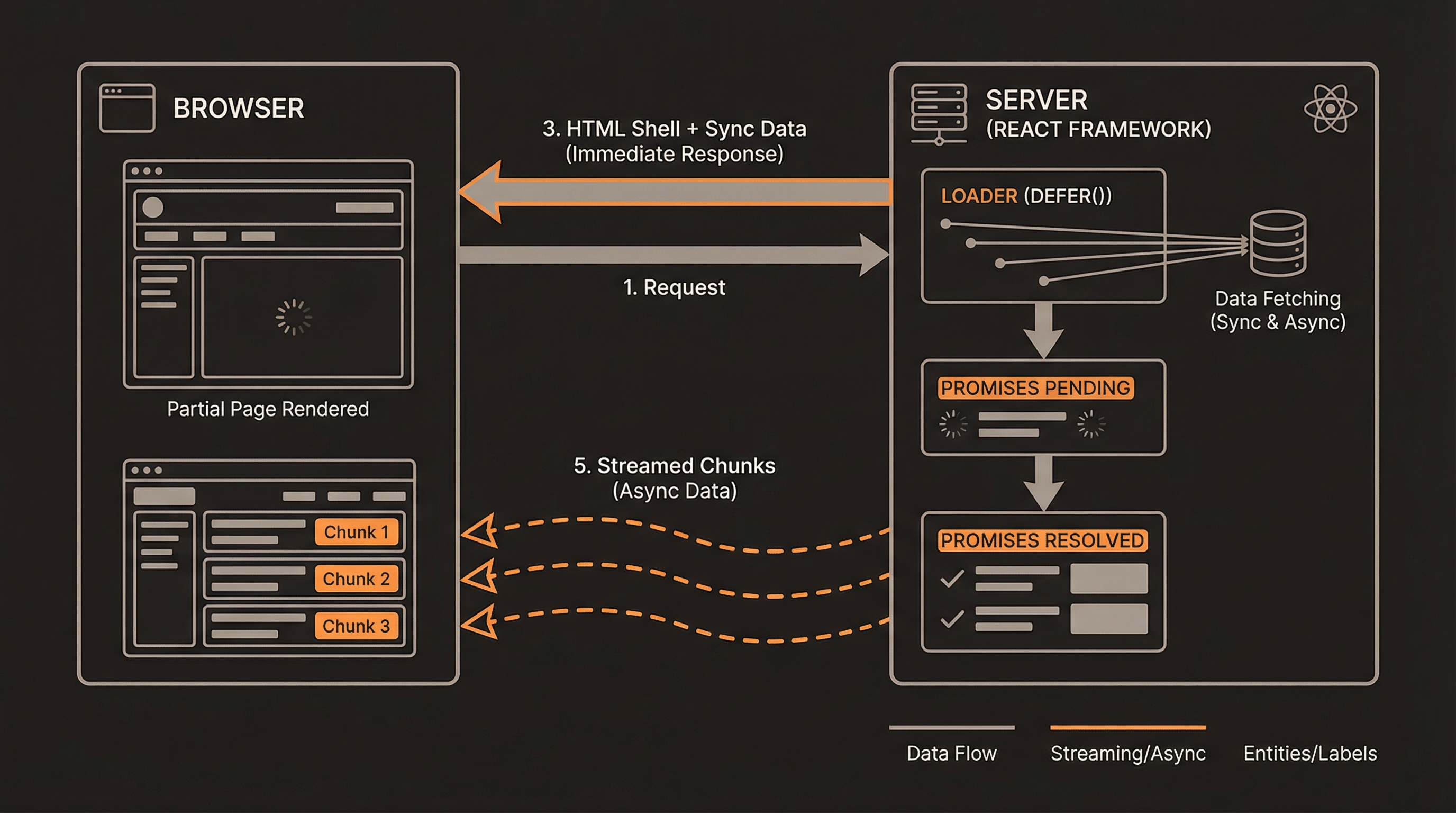
How does streaming SSR work in Pareto?
Section titled “How does streaming SSR work in Pareto?”import { defer, useLoaderData, Await } from '@paretojs/core'
export function loader() { const quickData = { total: 42 }
return defer({ quickData, // sent immediately slowData: fetchFromDatabase(), // streamed later slowerData: fetchFromExternalAPI(), // streamed even later })}
export default function Page() { const { quickData, slowData, slowerData } = useLoaderData()
return ( <div> <h1>{quickData.total} items</h1>
<Await resolve={slowData} fallback={<Skeleton />}> {(data) => <DataTable rows={data} />} </Await>
<Await resolve={slowerData} fallback={<Skeleton />}> {(data) => <Chart data={data} />} </Await> </div> )}What happens under the hood?
Section titled “What happens under the hood?”- The loader returns
defer({ ... })with a mix of resolved values and promises - The server sends the HTML shell immediately with the resolved values
- As each promise resolves, React streams the result into the page
- The
<Await>component shows itsfallbackprop until the promise resolves, then renders the children
Each <Await> component creates its own React <Suspense> boundary internally. When the promise resolves, React replaces the fallback content in-place without a full re-render. On the client after hydration, this is the same mechanism React uses for lazy-loaded components.
When should I use streaming?
Section titled “When should I use streaming?”Use defer() when you have data with different loading speeds:
- Fast data (user session, cached config) → return directly
- Slow data (database queries, external APIs) → wrap in a promise, let it stream
If all your data is fast, just return it directly from the loader — no need for defer(). Adding unnecessary defer() calls adds complexity without benefit.
When should I avoid streaming?
Section titled “When should I avoid streaming?”Streaming is not always the right choice. Avoid defer() in these situations:
- SEO-critical content — Search engine crawlers may not execute JavaScript to reveal streamed content. If a piece of data must appear in the initial HTML for SEO, return it directly from the loader instead of deferring it.
- Small payloads — If the total data fetching time is under ~50ms, the overhead of streaming setup is not worth it. Just return everything synchronously.
- Dependent data — If your component cannot render anything meaningful without all data present, deferring individual pieces creates a worse experience (multiple loading spinners instead of one). Await all promises in the loader and return the resolved result.
How do I handle errors in streamed data?
Section titled “How do I handle errors in streamed data?”When a deferred promise rejects, the <Await> component throws the error, which is caught by the nearest React error boundary. Wrap <Await> in a ParetoErrorBoundary for granular error isolation:
<ParetoErrorBoundary fallback={({ error }) => <p>Failed to load data.</p>}> <Await resolve={slowData} fallback={<Skeleton />}> {(data) => <DataTable rows={data} />} </Await></ParetoErrorBoundary>Without a ParetoErrorBoundary around a specific <Await>, the error bubbles up to the nearest ancestor error boundary. This means a single failed deferred promise can replace your entire page with the error UI. For a better user experience, wrap each <Await> in its own ParetoErrorBoundary so that failures are contained to the section that failed.
See Error Handling for more on how error boundaries work.